Today my iPad told me it was out of space. Not believing that for a second, I remembered that I had taken about 9 GB worth of RAW photos last weekend, and dumped them all on the iPad. I thought they were deleted by Aperture after I imported them, but I guess they weren't.
Lacking any easy way of deleting photos through Aperture's Import interface, or through Image Capture [Edit: Image Capture does allow 'select all' or 'batch selection' of photos to delete] (without having to reimport all the photos again), I found a useful shortcut to selecting tons of photos at once on the iPad for deletion.
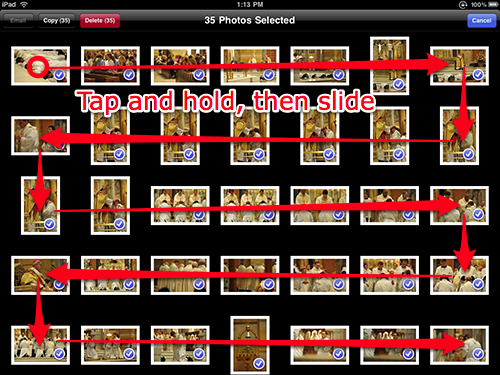
Simply tap the share button to start selecting photos, then hold your finger down on a photo until it is selected (the little blue arrow shows up on the bottom right), and swipe your finger across multiple photos .
Nice!