The new feature reportedly reduces the latency significantly on the standard memory, eliminating any need for EXPO ULL.
AMD's new EXPO ULL (Ultra Low Latency) is the company's latest and enhanced EXPO memory profile that can optimize DDR5 memory timings for lower latency. This next level of optimization helps directly in memory-oriented workloads and in gaming, where applications can take advantage of tighter timings.
The feature affects the sub-timings to minimize the latency on EXPO ULL memory modules, resulting in a performance boost without an increase in the clock speed. However, the AMD EXPO ULL memory kits are noticeably more expensive than standard EXPO memory kits if you have been keeping an eye on the pricing of DDR5 memory kits.
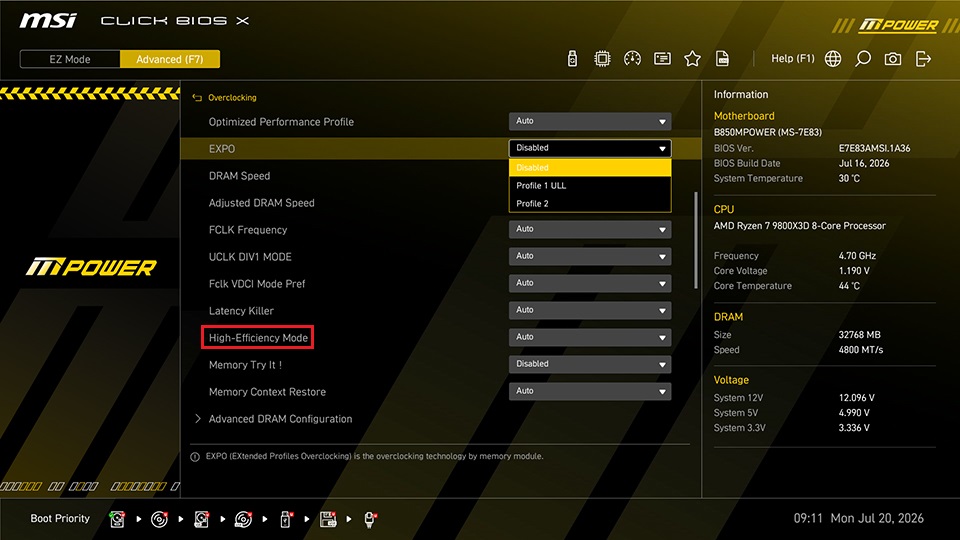
Since the final result may not be enough convincing to throw another $100 or $200 for slightly faster performance, MSI has decided to step in with its proprietary technology. The company has today introduced "High-Efficiency Mode", which will be available on its AM5 motherboards even for the standard memory modules. While MSI didn't explain how the new feature works, it says that it tweaks the timings similar to the EXPO ULL technology, resulting in similar tight timings.
MSI tested this out by comparing a G.Skill F5 DDR5 6000 MT/s EXPO ULL memory with a standard G.Skill F5 6000 MT/s memory on an MSI B850MPOWER paired with an AMD Ryzen 7 9800X3D. By keeping everything at default, the company found that the standard EXPO memory kit with CL30-38-38-96 timings delivered a latency of 79.4 ns , which is noticeably higher than that of the EXPO ULL memory kit, which delivered just 71.4 ns latency.

However, with High-Efficiency Mode, the standard EXPO memory kit was able to achieve significantly lower latency of just 71.6 ns , which is comparable to that of the EXPO ULL memory kit. MSI says that this feature doesn't affect the latency of EXPO ULL memory by a huge margin, and there's no need to turn it on when you are already using the latest ULL memory kit.
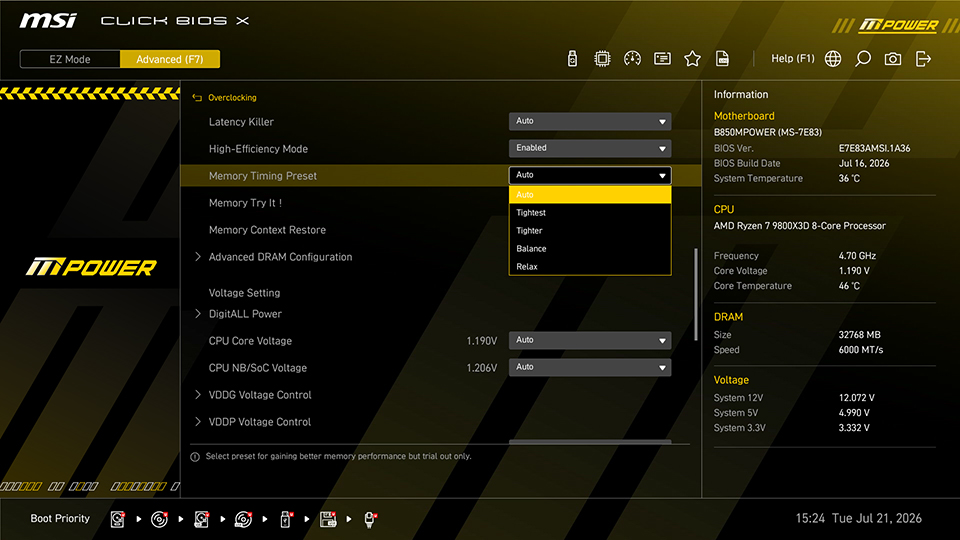
MSI says you no longer need to buy the more expensive ULL kits, as standard EXPO memory modules will be sufficient for high performance if you are using an MSI motherboard. The feature is available in the MSI CLICK BIOS X and will be available in the Overclocking tab. The High-Efficiency Mode comprises four different presets to choose from: Tightest, Tighter, Balance, and Relax, allowing users to have options according to their preferences. To ensure you have this feature, you need to download the latest BIOS from the official website.
News Source: MSI
Follow Wccftech on Google to get more of our news coverage in your feeds.