A decent cooling system sometimes isn’t enough to run Intel’s Core i9-13900K at full tilt, especially knowing that these desktop processors were not only power guzzlers, but reached toasty temperatures. One user showed that the exact same CPU reached an uncomfortable 155°C when running a load of just 93W. Thankfully, here’s why you shouldn’t fret over these numbers.
Incorrect temperature readers are some of the more common occurrences you’ll notice when firing up software like MSI Afterburner or even HWMonitor. Redditor “ertuui357” probably thought that his Core i9-13900K was going to melt after he took a picture of the desktop processor’s temperature reaching 155°C. It’s likely that the software was supposed to show the reading at 155°F, which converts to 68.3°C, an acceptable figure for a desktop CPU pulling 93W and being cooled by a decent cooler.
The image shown below is the settings menu of Cyberpunk 2077, and to remind you, the temperature limit of the Core i9-13900K is 100°C, meaning that it’ll thermal throttle long before it reaches 155°C, with the entire system shutting down before it even gets close to the aforementioned limits. As for the power limit, Intel’s specifications mention that the Core i9-13900K can operate at a sustained 125W PL1 power limit without worrying about throttling problems, as long as it’s being cooled properly.
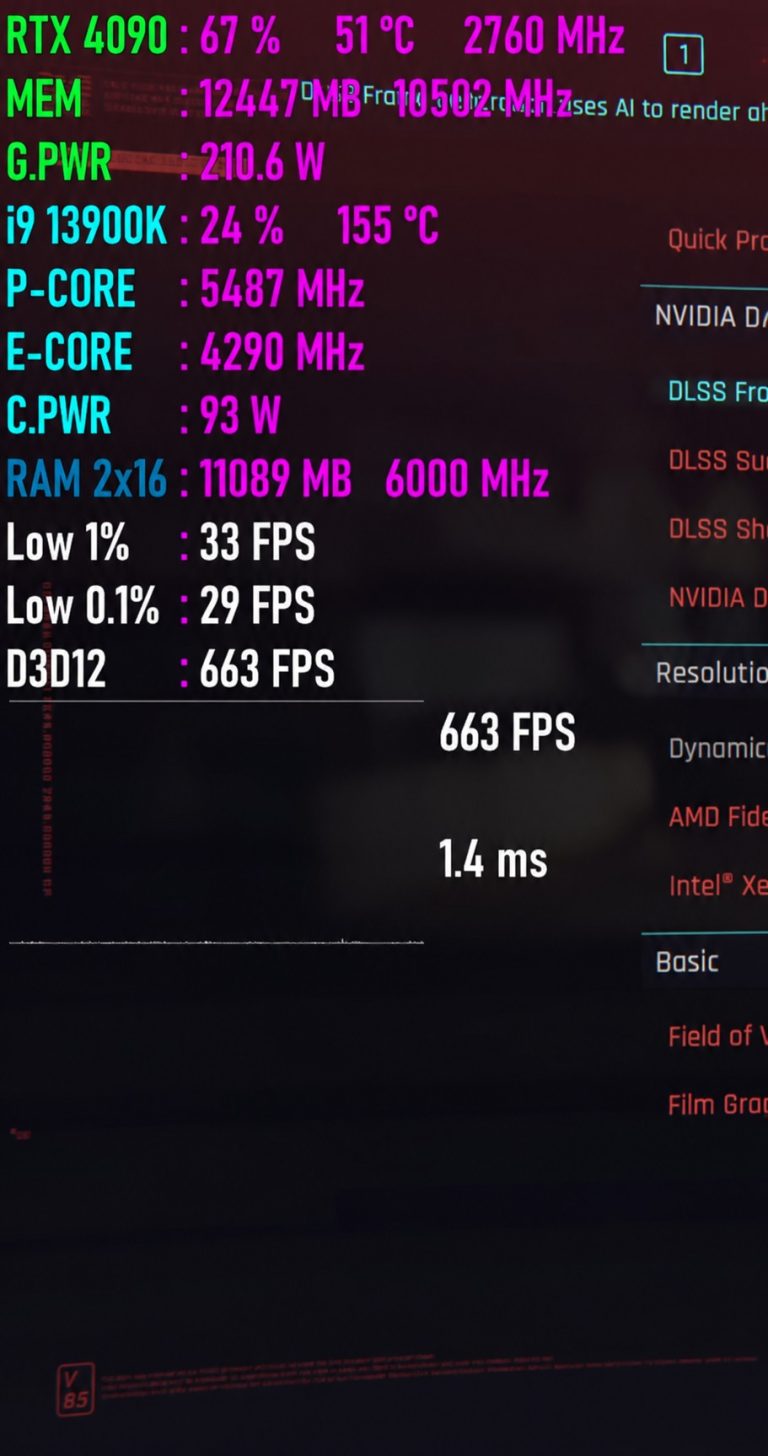
Without any power limits, this chip can reach 253W, at which point you’ll definitely need water cooling to prevent the Core i9-13900K from touching that 100°C limit. In short, just because your monitoring software is showing erratic readings doesn’t mean you should quit the application you’re running or pull the PC’s plug. A better solution is to exit programs like MSI Afterburner and restart them to get the correct readings, which fixes the problem for us at least.
There are also occasions when the GPU temperature doesn’t show up, but that’s the nature of such software, and there’s very little we can do to remedy the issue.
News Source: Reddit
Follow Wccftech on Google to get more of our news coverage in your feeds.