Older-generation MacBook Pro models featuring Intel’s power-hungry CPUs are still being used by the masses despite the Apple Silicon revolution, but it’s not like these machines are operating without migraine-inducing behavior. In fact, thermals continue to be one of the biggest gripes on these models, but one owner successfully managed to reduce the GPU’s idle power draw by nearly 80 percent thanks to installing an open-source utility that reduces the refresh rate down to 48Hz.
The 2019 version of the MacBook Pro belonging to Redditor “stlk0” featured a power-guzzling Intel Core i9 CPU paired with AMD’s Radeon Pro 5300M GPU. The owner was forced to use Windows Boot Camp instead of macOS because his use case required him to daily drive Microsoft’s operating system. The only problem is that Windows not only consumes more battery life, but the MacBook Pro would also run hotter when running Boot Camp.
After trying and failing to reduce the thermals by limiting the CPU power limit, reducing Turbo Boost, and tweaking Windows power settings, the Redditor realized that the Radeon Pro 5300M remained active at all times, with the GPU’s memory clock staying high at idle when the display was running at 60Hz, resulting in increased power usage and heat generation.
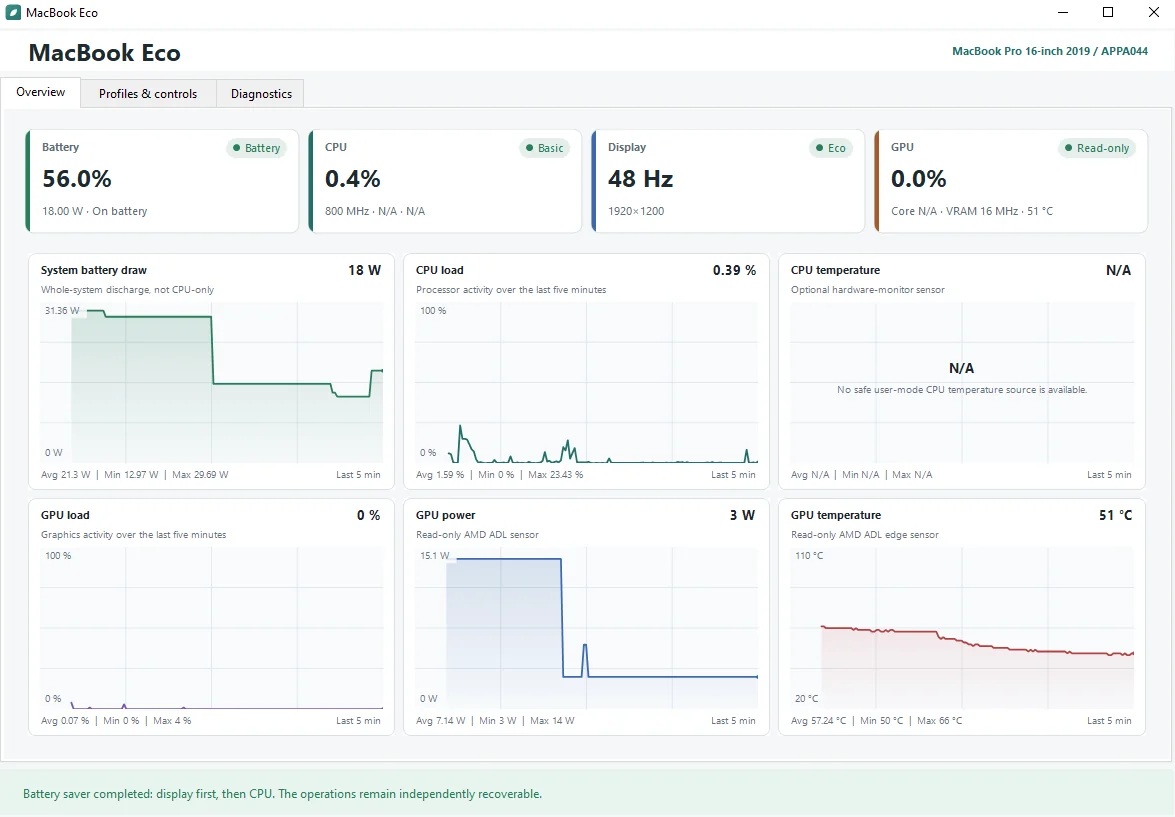
Frantically searching for a solution, the Redditor learned that reducing the refresh rate from 60Hz to 48Hz would make all the difference. Unfortunately, there was no option present in Windows Boot Camp, but that didn’t deter the MacBook Pro owner, as he created an open-source utility and published it on GitHub , enabling the portable Mac to automate the addition of a custom 48Hz mode.
With this solution, the Radeon Pro 5300M’s idle GPU power draw dropped from 14W to just 3W, resulting in a near-80 percent reduction, with temperatures dropping from 66°C to 51°C. Unsurprisingly, this tweak improved battery life and kept the fan noise to a minimum. Those who still haven’t jumped on the Apple Silicon bandwagon can try out the utility linked above to see if they get the same results and squeeze more life out of their Intel-powered MacBook Pro.
News Source: Reddit
Follow Wccftech on Google to get more of our news coverage in your feeds.