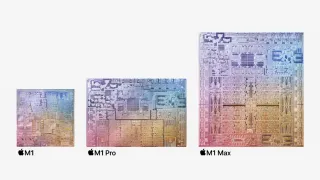
Apple is continuing it's crusade to banish Intel from its lineup with two more processors: the M1 Pro and M1 Max, professional-grade processors debuting in the 14-inch and 16-inch MacBook Pros .
Here's everything you need to know about the M1 Pro and M1 Max in one spot. We also have a separate article on the original M1 .
Apple M1 Pro and M1 Max Specifications
| M1 | M1 Pro | M1 Max | |
|---|---|---|---|
| Process Node | 5nm | 5nm | 5nm |
| Transistors | 16 billion | 33.7 billion | 57 billion |
| CPU Cores | 8 | 8 or 10 | 10 |
| GPU Cores | 7 or 8 | 14 or 16 | 24 or 32 |
| Memory Bandwidth | 68.25 GBps | 200 GBps | 400 GBps |
| Maximum Memory | 16GB | 32GB | 64GB |
To boost the M1 Pro and M1 Max over the original M1, Apple has put tons of work into memory bandwidth as well as increasing core counts. Whereas M1 has an 8-core CPU and up to a 7-core GPU, the M1 Pro goes up to 10 CPU cores and up to 16 GPU cores (though the base 14-inch MacBook Pro has slightly watered down versions of both). The M1 Max has 10 CPU cores and either 24 or 32 GPU cores depending on the configuration you get.
At 57 billion transistors. the M1 Max is the largest CPU Apple has ever made while the M1 Pro has 33.7 billion transistors. Both are made on the same 5-nanometer process as the existing M1.

One other huge difference is memory bandwidth. Where M1 reaches 68.25 GBps, the M1 Pro climbs to 200 GBps and the M1 Max reaches 400 GBps.
Both the M1 Pro and M1 Max have the same 16-core neral engine for machine learning tasks. Additionally, both MacBook Pros feature fans for cooling. The M1 went fanless in the MacBook Air, while the 13-inch MacBook Pro and Mac Mini both used fans.
We're still waiting on third-party benchmarks to see how these perform.
Apple M1 Pro and M1 Max Release Date
You can already buy the first computers with the M1 Pro and M1 Max. The 14-inch and 16-inch MacBook Pro are up for pre-order and they’ll ship on October 26.
Apple is keeping the 13-inch MacBook Pro with M1 around as a pseudo-budget option for those who want something smaller.
Apple M1 Pro and M1 Pro Max Price
Like the M1, Apple is making the M1 Pro and M1 Max in-house, so you're only going to get it in Apple's computers. You can't price out the silicon on its own, but rather the entire products you get them in.
The 14-inch MacBook Pro starts at $1,999, with an M1 Pro but instead of the typical 16-core GPU, there are only 14 cores enabled. For the 10-core CPU and 16-core GPU, you'll have to pay at least $2,499 on the 14-inch Pro or the starting 16-inch MacBook Pro, which is the same price. Those come with 16GB of RAM and 512GB of SSD storage and go up from there.
To get the M1 Max, you need to spend a lot more. A version with the 10-core CPU and 24-core GPU is an extra $500 over the base model on the 14-inch laptop, bringing it to a minimum of $2,899 (this also boosts you to 32GB of RAM). But to get the full-fat 10-core CPU and 32-core GPU, it's an extra $700, or $3,099 (again, with 32GB of memory).
The 16-inch MacBook Pro with a M1 Pro Max is $3,099 with the 24-core GPU or $3,299 with the full-fledged 32-core GPU. Both start with 32GB of RAM and a 512GB SSD, but cost more with upgrades.
Apple M1 Pro and M1 Max Battery Life
Apple isn't discussing battery life by processor, but rather by laptop size. It says the 14-inch MacBook Pro will get up to 17 hours of battery life based on its video playback tests, while the 16-inch model will go up to 21 hours.
We'll have to see these MacBooks perform on other benchmarks and in real-world scenarios to know whether they can beat any of the best ultrabooks and premium laptops
Apple M1 Pro and M1 Max Display Connectivity
For some creative professionals, the M1's limit of powering a single external display was a disappointment. That changes with the M1 Pro and M1 Max.
Apple claims the M1 Pro can connect to a pair of its Pro Display XDR displays, while the M1 Max supports up to three Pro Display XDRs and a 4K TV simultaneously.
Which apps and games run natively?
This hasn't changed from the Apple M1. In the time since that chip's release, many developers have made native M1 versions of their popular apps, including Google Chrome, Microsoft Edge, Photoshop, Pixelmator, Spotify, Logic Pro, Da Vinci Resolve, Adobe Premiere Pro, Microsoft Office 2019 and more.
For others that are still built for x86 processors, you'll have to run them in Rosetta 2, Apple's emulation software. There are, however, some apps that still don't run at all. The Apple developer and user community has put much of this record keeping to crowdsourced efforts, including isapplesiliconready.com and applesilicongames.com for video games.
macOS Monterey
The 14-inch MacBook Pro and 16-inch MacBook Pro will both come running macOS Monterey. Apple is still touting its chips' ability to run iPad and iPhone apps, but the new OS also allows for spatial audio, portrait mode for video chatting and changes to Safari and Messages as well as Focus Modes similar to what we saw in iOS 15.
Shortcuts will be revamped for Mac, and one of the best new iOS 15 features, live text, which lets you select text in images, will also be there. That's on top of improvements to Maps, AirPlay and Notes.
The killer feature was supposed to be Universal Control, which would let you use a keyboard and mouse to control both a Mac and an iPad simultaneously, including moving files from one to another. That won't be there when Monterey launches on Oct. 25, but will be there later this fall.