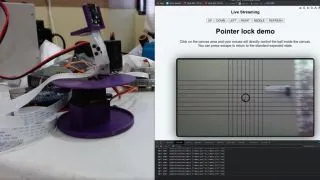
If you’re looking for a fun way to control your camera module with the Raspberry Pi , take a closer look at this mouse-operated camera system created by maker and developer Erwin Chin. With a custom web app and 3D printed housing, he’s devised a simple interface for changing what the camera is focused on using nothing more than mouse input. Likening the project to a first-person shooter game, users are able to look around through the camera with crosshairs overlaying the video feed.
While this is the first Raspberry Pi project we’ve seen from Chin, a quick look at his GitHub history indicates experience with Python—the go-to choice for many developers on the Raspberry Pi. This also appears to be the first 3D-printed project Chin has shared to Thingiverse.
This project relies on both a Raspberry Pi and a separate machine to access the web interface. Users can log into the web app to see what the camera sees in real-time—moving the cursor around the web app window causes the camera to move in the same direction with reasonable speed and accuracy.
A Raspberry Pi 3B+ is used to operate the camera and run the web app, but there’s no reason you couldn’t use a Pi 4 module. A Zero W might pull off the project as well, but you’ll have better luck with a bit of extra memory from the bigger Pi models. The camera module used is a Raspberry Pi Camera v2.1 mounted to a custom 3D-printed frame . This frame also houses a couple of RDS3115mg servo motors and an Adafruit 16ch PWM HAT to help drive them.
Users have a few options for running web servers on the Pi. In this case, Chin opted to use a Flask server along with MJPEG to stream the video feed to the browser window. The pan/tilt directions are handled using MQTT commands. Chin was kind enough to make the project open-source with all of the code used in this project made available over at GitHub .
If you’d like to recreate this Raspberry Pi project , check out the original project thread on Reddit , and be sure to follow Chin for more projects and any future updates on this one.
