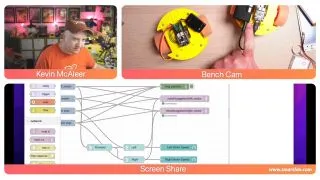
It has been only a few days, and already intrepid Raspberry Pi hackers are finding new ways to take advantage of the new Raspberry Pi Pico W . The latest $6 microcontroller adds Wi-Fi to our favorite microcontroller and makers are already integrating it into their projects. Both Sam Machin and Kevin McAleer have recently shared demos that control the Raspberry Pi Pico W over Wi-Fi with MQTT (Message Query Telemetry Transport) acting as a means of communication where devices "publish" data via a "broker" with other machines "subscribing" (listening) for the published data.
This simple configuration allows users to add remote control capability to a wide array of projects at just $6 a pop. The MQTT protocol is already a popular choice for adding remote communication in the Pi community so this setup was somewhat anticipated.
Machin has a history of tinkering with various microelectronics and in his video, shows a basic demo of how to use MQTT with the Raspberry Pi Pico W. McAleer is well-known for his DIY robotics projects and has upgraded his Burgerbot to use the Pico W for remote control. Both makers are using Node-RED (a browser based, event driven language) to set up the MQTT protocol.
Assuming you already have a wireless network to use in your project, the only hardware you’ll need to recreate this system is a Raspberry Pi Pico W. Getting hold of hardware right now can be tricky but, thankfully, we've taken the time to highlight the best places to buy a Raspberry Pi Pico W . Once you’ve got a Pico W and a network to use, the next step is to program the Pico W and connect it to your network.
If you’re new to using MQTT , your best bet is to check out the official website to get an idea of what it is and how it works. You can also find Node-RED at GitHub—this is an open-source tool that allows users to construct complex systems with a drag and drop interface, eliminating the hurdle that comes with programming from scratch.
If you want to recreate this setup for your Raspberry Pi project , check out the project Github page for Sam Machin’s demo as well as Kevin McAleer’s Burgerbot project page for additional details and a close look at the source code behind their work. Be sure to follow them both for more cool projects as well as any future updates.
