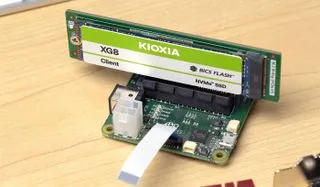
One spec on the Raspberry Pi 5 that the community is eagerly buzzing about is the new PCIe port. This enables compatibility with a variety of devices, most notably SSD support. Today, we’re taking a look at maker Jeff Geerling and his experience with booting the Pi 5 using an NVMe SSD. Geerling was given access to a PCIe breakout board by the Raspberry Pi engineering team, but there will be an M.2 HAT addon coming in 2024. The addon will bring an M.2 connection for a 2242 NVMe SSD.
There are multiple benefits to using an SSD with the Pi 5. One of the most obvious benefits is the performance boost you get using an SSD over a microSD card. Being able to access data quickly is a game changer if you’re using your Pi to access media on the regular. But if you want to take things further, booting the Pi off an SSD allows the entire operating system to perform with the speed of an SSD rather than just the SD card.
Setting up the Pi to boot off an NVMe SSD is simple and Jeff provides lots of details explaining how to make it work. The only way you can use the SSD to specifically boot is to enable the function first. This can be done by adjusting the boot order configuration file on the Pi. Once it’s set to point to the SSD, the Pi will check it first when booting and run the OS if it’s installed.

The external PCIe port also needs to be manually enabled. With it enabled and the boot device order set properly, it’s possible to boot from the SSD. You will need a valid partition, though, and the Raspberry Pi Imager is only set up to flash microSD cards.
To set up the SSD with Raspberry Pi OS, you will need to flash the OS onto a microSD card. At this point, you can clone the boot volume off microSD card and copy the data over to the SSD. As long as the SSD is connected directly to the PCIe port, it will boot. That said, Geerling was unable to boot the Pi from an SSD if it was connected behind a bridge or switch.
It's also worth keeping in mind that you won't get the full potential speed of most SSDs when connecting to the Pi 5, as there is just a single PCIe 2.0 lane available. In theory, that gives you about 500MBps of PCIe bandwidth. So you're going to top out at roughly the performance of a fast SATA SSD.
To get a closer look at this Raspberry Pi project in action, check out the full post shared by Jeff to his blog. If this project is up your alley, you should be sure to follow Jeff Geerling for more cool Pi projects as well as any future creations.