Falcon Northwest steps up with a solution for Intel 13/14th Gen CPU users suffering from stability issues

While Intel is still investigating stability concerns on the latest Raptor Lake CPUs, system integrators are coming up with solutions. Falcon Northwest, a boutique PC vendor, is selling many high-end systems equipped with Core i9 CPUs. The company has come up with an idea to share recommended settings for users experiencing stability issues and crashes that may help.
The recommendations are for the ASUS Z790 motherboards, where the BIOS step-by-step guide is provided. The guide is mainly for users who already experience problems with 13th Gen and 14th Gen Core CPUs from the Core i9 K and KS series, who are more likely to be affected by motherboard ‘generous’ power limits.
The recommendations can mitigate problems for users who own ASUS UEFI BIOS and whose CPUs are already showing stability issues during gaming. Some CPUs may already require stricter settings, such as restricting the Performance core multiplier to 50, which will lock the CPU from going past 5.0 GHz. Of course, in this case, the CPU will lose its performance benefit.
Falcon Northwest guide
- Update to latest BIOS. Load defaults.
- Set all values:
- Go to “AI Tweaker” main tab
- ASUS MultiCore Enhancement → Set to DISABLED
- SVID Behavior → Leave on Auto, unless necessary for stability. If so, set INTEL FAIL-SAFE
- Go to “AI Tweaker → Internal CPU Power Management”
- IA CEP → ENABLED
- SA CEP → ENABLED
- Inverse Temperature Dependency Throttle → ENABLED
- Go to “Thermal Velocity Boost” Sub-Menu in the “AI Tweaker” Main Page
- TVB Voltage Optimization → ENABLED
- Enhanced TVB → ENABLED
- Overclocking TVB → DISABLED
- Go to main “Advanced Tab / CPU Configuration / CPU – Power Management Control”
- CPU C-States → ENABLED
- Enhanced C-States → ENABLED
- Reboot
- Go back to BIOS. Check power values set vs. this table. If different, set manually. Our settings undo many that are outside Intel’s specs. Unknown if they prevent issues & can’t fix all CPUs, but are safer. While we await official news, we wanted share what helped us.


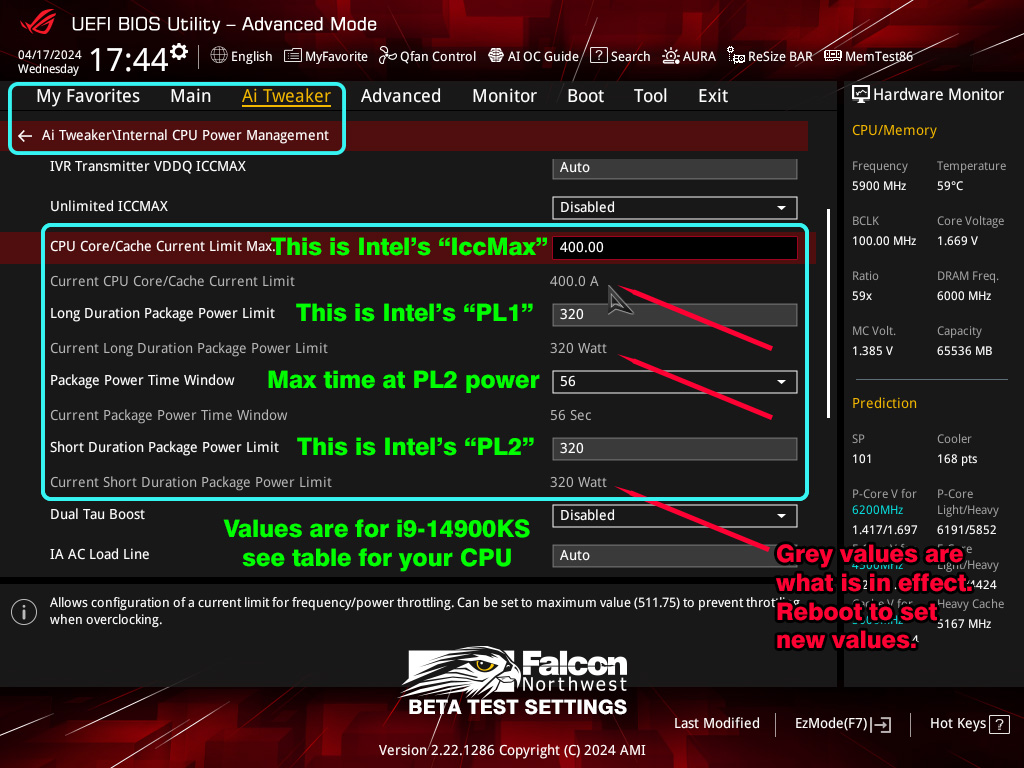

Gamers experiencing ‘out of video memory’ or crashes, especially in Unreal Engine games, should look at the proposed solutions and see if any of these changes have any effect on system stability. If they don’t, then maybe sending the CPU for warranty is a better solution.
As noted, users can also change the settings through a Windows app called XTU (Extreme Tuning Utility), but doing this through the BIOS is a more permanent solution that will work immediately when the system boots up.
What’s important is that Falcon Northwest’s guide is not an official guide proposed by Intel or ASUS, but rather what the company has figured out as working during their internal testing. Users are welcome to provide feedback.
Source: Falcon Northwest , HotHardware