It’s been a while since Apple launched the new M4 Macs , and as more people get their hands on these computers, reports of unexpected issues surface on the web. Now there’s a group of users complaining about compatibility issues between M4 Macs and ultrawide monitors.
As noted by many users on the , and even corroborated by a 9to5Mac reader, the seem to break support for some ultrawide monitors. More specifically, those with 5K2K (5120 x 2160) resolution.
According to these reports, don’t display the proper resolution options for these monitors, which makes the interface and text look blurry. The same monitors work just fine with older Macs, whether Intel or Apple Silicon. But when connected to an , they no longer work in HiDPI mode – which upscales the interface to make it sharper.
Although most of the reports on the web seem to come from owners, users also report similar issues.
“While I can select the same resolution on my Mac Mini M4, it doesn’t show HiDPI, and it (indeed) looks worse,” said a user who claims that the HiDPI option works when the monitor is connected to their M1 MacBook Pro. “Same problem here – MacBook Pro M1 Max: no problem. MacBook Pro M4 Max: 3840 x 1620 resolution is missing,” another user said.
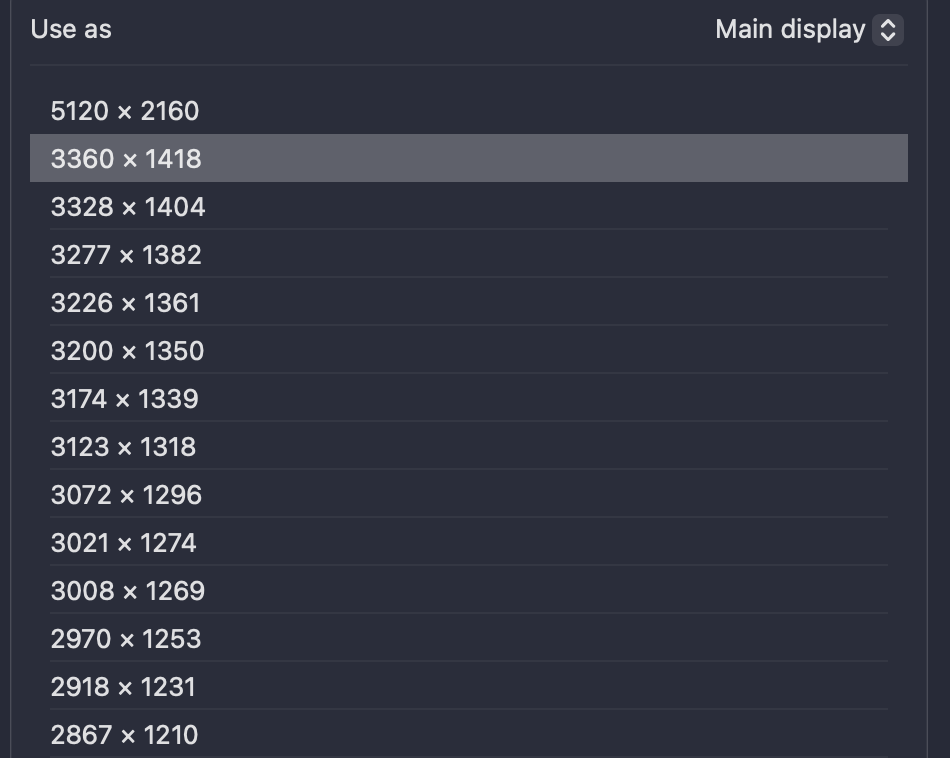
Some users have managed to enable HiDPI using third-party tools such as BetterDisplay, but this causes other drawbacks such as the refresh rate dropping from 75Hz to 60Hz. Apple is yet to acknowledge the bug. For now, the best workaround for owners of ultrawide 5K2K monitors is to avoid buying until the problem is fixed.
Have you experienced similar issues with your Mac? Let us know in the comments section below.
H/T: Cibelly Aguiar!
FTC: We use income earning auto affiliate links. More.