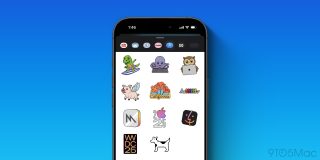
WWDC is only a few weeks away , and the just got updated in preparation. There’s little new inside the app to explore, but one nice addition can be found in the Messages app: new iMessage stickers.
The Apple Developer app was to version 10.8. Per release notes, new to this update:
- Explore all WWDC25 has to offer, including video sessions, online activities, and more.
- We’ve fixed bugs and added various other enhancements.
Opening the app reveals not much has changed yet. If you visit the WWDC tab, there’s just a single screen with a simple plug for the conference and link to a web view where you can see more details.
When WWDC actually arrives, the app will be home to video sessions and a lot more content.
For now though, there’s still a reason to get excited for the new update: iMessage stickers.
Apple has shipped a fresh batch of stickers with today’s update, which you can access inside the Messages app.
In case it’s been a while since you used a sticker, here’s a step-by-step:
- Make sure the latest Apple Developer app update is installed
- Open the Messages app
- Hit the ‘+’ button
- Tap ‘Stickers’
- Then locate the Apple Developer app icon
There are now a total of 11 sticker options provided by the Apple Developer app, including updated WWDC 2025 stickers.
Do you ever use iMessage stickers anymore? Let us know in the comments.
FTC: We use income earning auto affiliate links. More.