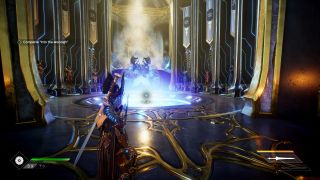
AMD released its FidelityFX Super Resolution to the public today, along with a new 21.6.1 driver , and we've been testing it via early access for the past few days. Hailed as Team Red's alternative to DLSS , but with open arms to embrace all GPUs, many hoped for a better universal upscaling and enhancement solution. FSR does what it promised—faster performance by rendering at a lower resolution and then upscaling—and it ran on every recent GPU we threw at it, but there's more to discuss than raw performance improvements. Specifically, we wanted to focus on image quality to see whether FSR can match DLSS 2.0.
Let's start with a quick overview of what the algorithm does. Upscaling lower resolution content and then applying a sharpening filter is something that has been done for quite some time. Early Blu-ray players and HDTVs would 'enhance' 720x480 DVD content, and modern 4K players can do the same for 1080p content. Depending on the amount of sharpening, the results can range from good to "oops, that's too much" to where you see halos on all the edges. AMD's FSR tends to land closer to the 'good' end of the spectrum, at least at the higher quality settings.
The FSR algorithm has two components. First, it does an upscaling pass to a higher resolution, with an edge detection component that works to generate a good result—better than bicubic filtering would be the goal. Then it applies a sharpening filter, and from what we can tell, this is basically just AMD's existing CAS (Contrast Aware Sharpening). CAS on its own at native resolution looks quite good most of the time, and it's relatively lightweight. So the combination of spatial upscaling combined with CAS should provide decent results, as long as you don't push things too far.
| FSR Preset | Scale Factor | 4K Input | 1440p Input | 1080p Input |
|---|---|---|---|---|
| Ultra Quality | 1.3X | 2954x1662 | 1970x1108 | 1477x831 |
| Quality | 1.5X | 2560x1440 | 1706x960 | 1280x720 |
| Balanced | 1.7X | 2259x1270 | 1506x847 | 1130x635 |
| Performance | 2.0X | 1920x1080 | 1280x720 | 960x540 |
The scaling factor ends up being the critical component, and it's important to remember that it applies in both dimensions. 1.3X upscaling isn't just 23% fewer pixels to render; it's 41% fewer pixels. In performance mode, the game only has to render 25% as many pixels before applying the upscaling and sharpening filters, which naturally provides a large boost to performance in most games.
At Ultra Quality, FSR looks quite close to native rendering (without CAS, if the game supports it), and even Quality mode looks quite close to the original. But as you'd expect, the more upscaling that takes place, the more artifacts you'll notice, and the Balanced and Performance presets definitely represent compromise—and we'd say the same for DLSS in Performance mode.
Let's move over to image quality comparisons for FSR and DLSS now, and we'll scramble the order and provide a guessing game of sorts (with answers at the end). At present, we had access to five games with FSR ( Anno 1800 , Godfall , Kingshunt , Riftbreaker , and Terminator: Resistance ). Two other games should have FSR patches available today, 22nd Century Racing Series and Evel Genius 2 . Besides those seven games, AMD lists 12 more games that will be getting FSR support "soon": Far Cry 6 , Resident Evil Village , Forspoken , MYST , Dota 2 , Necromunda Hired Gun , Baldur's Gate , Swordsman , Farming Simulator 22 , Astergos , Vampire the Masquerade: Blood Hunt , and Edge of Eternity . Some of those aren't even out yet, but hopefully Far Cry 6 has FSR enabled at launch.
AMD also notes that over 45 games now have one or more FidelityFX elements enabled. That's slightly behind the more than 55 games that now come with DLSS, and of course, many of the games with FidelityFX aren't using FSR right now. But over time, particularly considering the AMD hardware in the PlayStation 5 and Xbox Series S/X, we should see more games adopt FSR. But how does it look?
FidelityFX Super Resolution Image Quality
Note: You'll want to view these on a high resolution display at full quality. They'll probably look nearly identical on a smartphone. 'Answers' to what settings are used are at the end of the article, but try to look at the images before cheating. :-)











In Godfall , FSR Ultra Quality is easy to recommend. There's a slight loss in detail, but in motion, you likely won't notice the difference. Having the UI overlay applied at the target resolution (4K in the screenshots) also helps keep the text looking sharp. The Quality mode looks decent as well, though the softness becomes more noticeable, while the Balanced and Performance modes should be easy enough to spot. We've got two sets of images, including one with native rendering plus FidelityFX CAS—something AMD recommended turning off, probably because the extra sharpening at native resolution makes it far easier to tell when FSR renders at a lower resolution.





FSR at Ultra Quality in Terminator: Resistance might actually look better than pure native rendering. There's a bit of an anomaly with the rocky ground seemingly using different levels of tessellation in our screenshots, but otherwise, the images don't have a bunch of smoke and lighting effects that dynamically change between screen captures. A few areas in the image clearly show artifacts, however, like the end of the gun barrel.










Finally, as a counterpoint, here are some screenshots from Cyberpunk 2077 , this time using DLSS 2.0 in Quality, Balanced, and Performance modes—we even included the Ultra Performance 9X upscaling mode for fun. However, that's mostly intended for gaming at 8K, or whatever.
One thing that's immediately obvious in Cyberpunk is the movement of other people, even the view bob, plus dynamic effects like smoke. It makes perfect A/B comparisons a bit more difficult, but you can still spot some differences, particularly if you look at the floor. (It also makes it way easier to determine which settings were used in the various images, but oh well.) The grate in the second series of images looks really bad in Ultra Performance mode, and in motion, it doesn't look as good as non-DLSS regardless of setting, but that's more of an edge case. It's actually surprising how good DLSS looks in Ultra Quality mode overall, but that's partly due to the temporal reconstruction that takes place—standing still to take a screenshot really lets DLSS shine.
Differences Between FidelityFX Super Resolution and DLSS
That's a good segue into the key differences between FSR and DLSS. Where FSR uses spatial upscaling, DLSS has multiple inputs that feed into its neural network. Besides the source image (which is what FSR uses), DLSS takes motion vectors, temporal feedback from previous frames, and the results of the training algorithm (which uses 16K images as the "Ground Truth" target). There's a lot of computation happening with DLSS, and it requires the tensor cores of Nvidia's RTX cards to reach a playable result—or at least, that's what we're told. Since it's a proprietary algorithm, we have no way of trying to run DLSS on anything else.
Overall, in terms of straight image quality, we give DLSS the lead. DLSS also leads in the number of games that currently implement it, since it's had over a two-year head start, but DLSS 1.0 games don't look nearly as good as DLSS 2.0 and later. The real problem is that there aren't any games (yet?) that support both DLSS 2.0 and FSR, so we can't do an apples-to-apples comparison of image quality.
FSR has a few big advantages over DLSS, however. First, running on any modern GPU—possibly even Intel integrated graphics—means everyone can try it. Second, it doesn't require nearly as much computational work as DLSS, which means it can boost framerates far higher than we see in most DLSS games. Basically, you reduce the resolution and the framerate scales proportionately.
So if you're playing a game that comes in a bit short of 60 fps, DLSS and FSR can both get you into the fully smooth 60+ fps range. But if you're playing a game at 120 fps and you have a 240 Hz display, our experience is that DLSS won't generally scale that high—it becomes the limiting factor. On the other hand, FSR has no qualms about scaling to higher fps, and if you don't mind the loss of image quality, running in Performance mode often more than doubles performance. (So does running at 1080p instead of 4K.)
Initial Thoughts
We didn't have time to run a full suite of benchmarks on all the FSR games (yet), but we did confirm that it worked with multiple GPUs—even an Nvidia MX330 GPU on a laptop worked. Also, if you want the "solution" to the above galleries, here they are:
Godfall (FSR): 1-Quality, 2-Balanced, 3-Off, 4-Ultra Quality, 5-Performance, 6-Off+CAS, 7-Balanced, 8-Performance, 9-Off, 10-Ultra Quality, 11-Quality
Terminator: Resistance (FSR): 1-Balanced, 2-Ultra Quality, 3-Performance, 4-Off, 5-Quality
Cyberpunk 2077 (DLSS): 1-Ultra Performance, 2-Quality, 3-Off, 4-Performance, 5-Balanced, 6-Off, 7-Balanced, 8-Performance, 9-Quality, 10-Ultra Performance
Here's the full slide deck from AMD, showing AMD's performance results from its own internal testing for the interested. We didn't confirm all the numbers, but at least Terminator and Godfall showed similar fps for the cards we checked.
We're still working on our performance testing, and we'll provide an update soon. Stay tuned.