Following last week’s release, Apple is rolling out macOS 26.1 beta 4 for developers. Here’s what to expect from the update.
Aside from the usual bug fixes and performance improvements, Apple has been laying the groundwork for broader third-party AI integration on macOS Tahoe and later.
On Image Playground, Apple has been working on support for third-party generative image providers beyond ChatGPT , while on a broader level, the company has been preparing MCP support across its entire OS ecosystem.
Last week’s developer beta also introduced the new Apple TV icon and included references to a second-generation Apple Pro Display XDR . Apple also tweaked once again the Macintosh HD icon , this time removing the ports and holes seen in the previous version.
The build rolling out to developers right now is 25B5072a. It introduces a toggle for adjusting Liquid Glass transparency . We are digging through the release and will report back with what else we find.
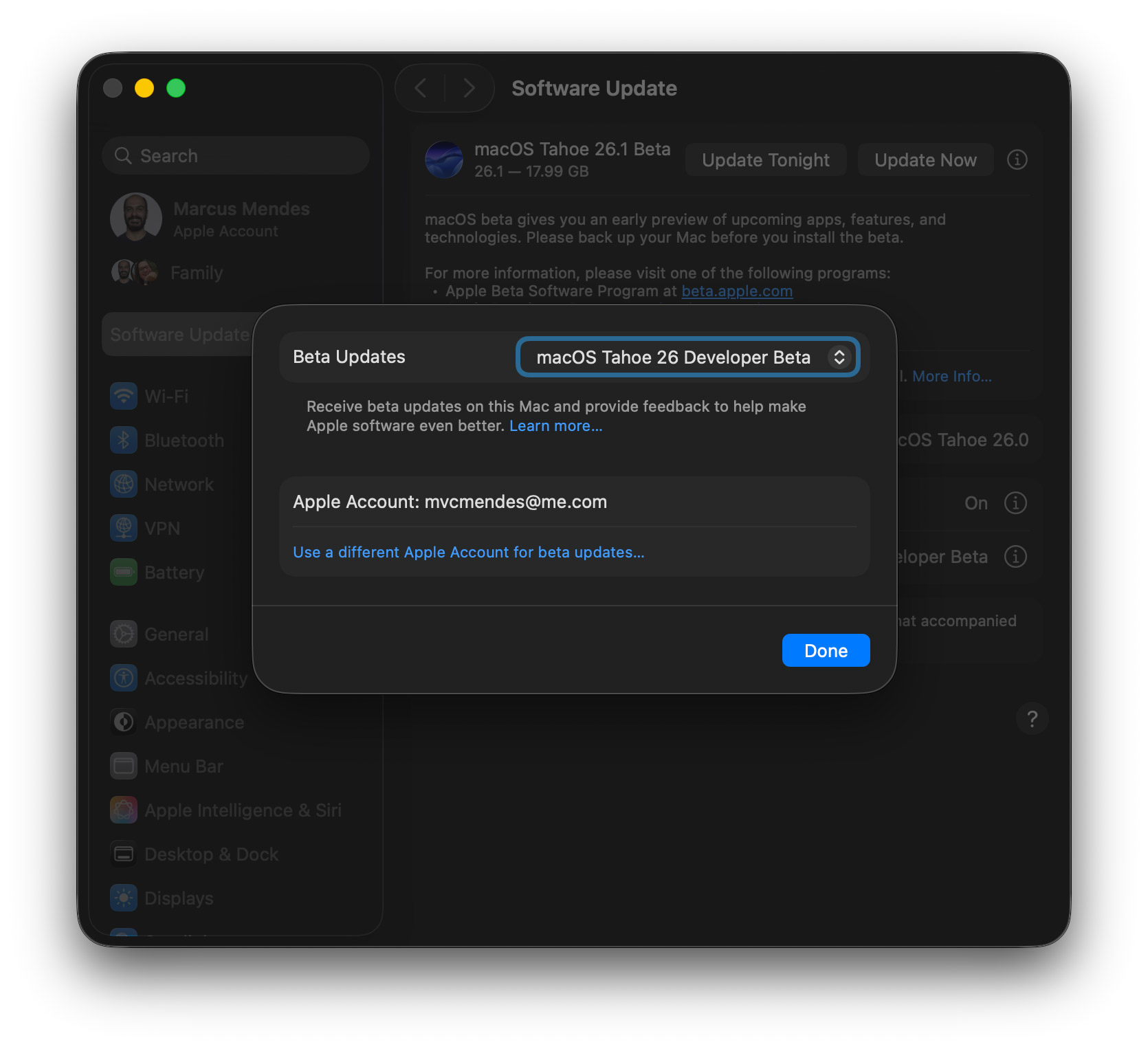
Here’s how to install the macOS Tahoe 26.1 developer beta 4:
- Backup your Mac
- Open System Settings
- Go to General ⇾ Software Update
- Click the ‘i’ icon next to Beta Updates
- From the dropdown menu in the top-right, select the macOS Developer Tahoe Beta
- Hit ‘Done’
Did you spot any changes in today’s betas? Let us know in the comments.
FTC: We use income earning auto affiliate links. More.