Launching my first Drupal 8 website â in my basement!
I've been working with Drupal 8 for a long time, keeping Honeypot and some other modules up to date, and doing some dry-runs of migrating a few smaller sites from Drupal 7 to Drupal 8, just to hone my D8 familiarity.
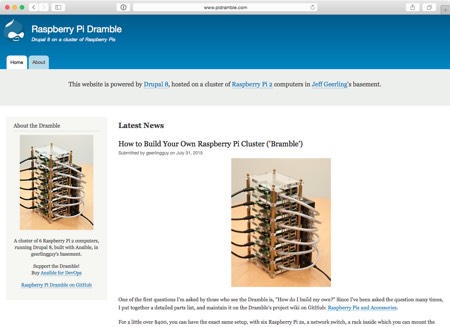
I finally launched a 'for real' Drupal 8 site, which is currently running on Drupal 8 HEADâon a cluster of Raspberry Pi 2 computers in my basement ! You can view the site at https://www.pidramble.com
The Constraints of in-home Website Hosting
I run dozens of websites, and help build and maintain many others. Almost every one of these sites is served on a server in one of the giant regional data centers in New York, Atlanta, Seattle, LA, Dallas, Chicago, and other major cities in the US and around the world.
These data centers all share some very important traits that are key to hosting high-performing, highly-available websites:
- Power redundancy (multiple power feeds, multiple backup power sources)
- 1 Gbps+ upload/
The Raspberry Pi Dramble, in Videos
The Raspberry Pi Dramble (which powers www.pidramble.com , run from my basement!) has been featured in a number of videos lately:
- Ansible 101 - on a Cluster of Raspberry Pi 2s
- Nginx Load Balancer Visualization on a Raspberry Pi Cluster
- Ansible + Drupal: A Fortuitous DevOps Match
- Ansible Serial/Forks Demo on a Raspberry Pi Cluster
The Dramble was even featured on PCWorld's 2015 list of Insanely Innovative and Incredibly Cool Raspberry Pi projects !
Nginx Load Balancer Visualization on a Raspberry Pi Cluster
After some more tinkering with the Raspberry Pi Dramble (a cluster of 6 Raspberry Pis used to demonstrate Drupal 8 deployments using Ansible), I finally was able to get the RGB LEDs to react to Nginx accesses âmeaning every time a request is received by Nginx, the LED toggles to red momentarily.
This visualization allows me to see exactly how Nginx is distributing requests among the servers in different load balancer configurations. The default (not only for Nginx, but also for Varnish, HAProxy, and other balancers)
Simple GlusterFS Setup with Ansible
The following is an excerpt from Chapter 8 of Ansible for DevOps , a book on Ansible by Jeff Geerling.
Modern infrastructure often involves some amount of horizontal scaling; instead of having one giant server, with one storage volume, one database, one application instance, etc., most apps use two, four, ten, or dozens of servers.
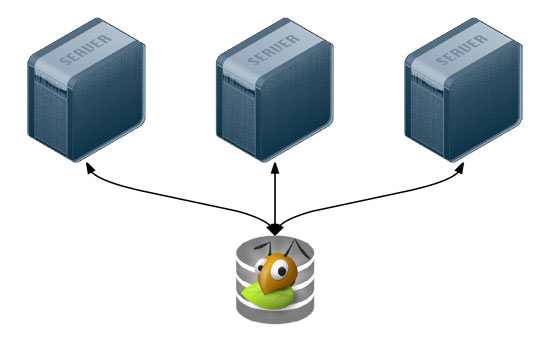
Many applications can be scaled horizontally with ease, but what happens when you need shared resources, like files, application code, or other transient data, to be shared on
Solving the Emoji/character encoding problem in Drupal 7
Update : As of Drupal 7.50, Emoji/UTF-8 mb4 is now supported for MySQL (and other databases) in core! See the documentation page here for more information on how to configure it: Multi-byte UTF-8 support in Drupal 7 . This blog post exists for historical purposes onlyâplease see the Drupal.org documentation for the most up-to-date instructions, and see my newer blog post here: Getting Emoji and multibyte characters on your Drupal 7
Tips for a better Vagrant-based development workflow
I build and destroy a lot of VMs using Vagrant in the course of the day. Between developing Drupal VM , writing Ansible for DevOps , and testing dozens of Ansible Galaxy roles , I probably run vagrant up and vagrant destroy -f at least a dozen times a day.
Building all these VMs would be a pain, and require much more user intervention, if it weren't for a few things I've done on my local workstation to help with the process. I thought I'd share these tips
Teaching Ansible with six Raspberry Pis
Originally posted on the Server Check.in blog :
Over the course of this year, I've acquired six Raspberry Pi model 2 B computers, and configured them in a cluster (or 'bramble') so I can use them to test different infrastructure configurations, mostly for running Drupal 8. All the Ansible playbooks and instructions for building the cluster are available on the GitHub project page for the Raspberry Pi Dramble . [...]The video demonstrates Ansible's simple and powerful model of SSH-based
Ansible 101 - on a Cluster of Raspberry Pi 2s
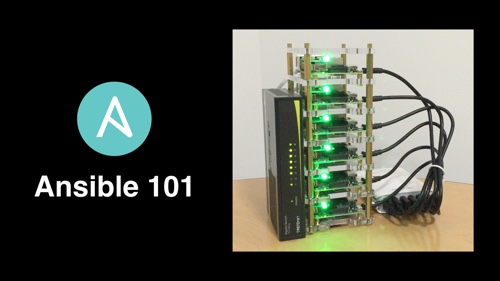
Over the course of this year, I've acquired six Raspberry Pi model 2 B computers, and configured them in a cluster (or 'bramble') so I can use them to test different infrastructure configurations, mostly for running Drupal 8. All the Ansible playbooks and instructions for building the cluster are available on the GitHub project page for the Raspberry Pi Dramble .
Each Raspberry Pi has its own RGB LED board that's wired into the GPIO pins, so they're controlled by software. I can demonstrate
Review: Truffol Autograph Fusion iPhone 6 case
tl;dr : The first time I've put a case on my iPhoneâand kept it on after a week!
I have always disliked iPhone cases. I've owned every iPhone since the beginning, and have never used a case; instead of a case, I kept the phone in a holster case on my left hip.
Every once in a while, I tried a new case, but returned it to the store within a day or two