利用 GRUB2 讀取 Ubuntu ISO (Using GRUB2 to load Ubuntu ISOs)
每次安裝新系統都要燒錄光碟吧……很浪費呢……
用外置裝置吧……要將裝置中的資料備份,再格式化裝置,再將映像檔寫入……
但若果沒有以上的裝置,哪如何安裝新系統?
If you want to install a new system to your harddisk,
You need write a install disc, it is a little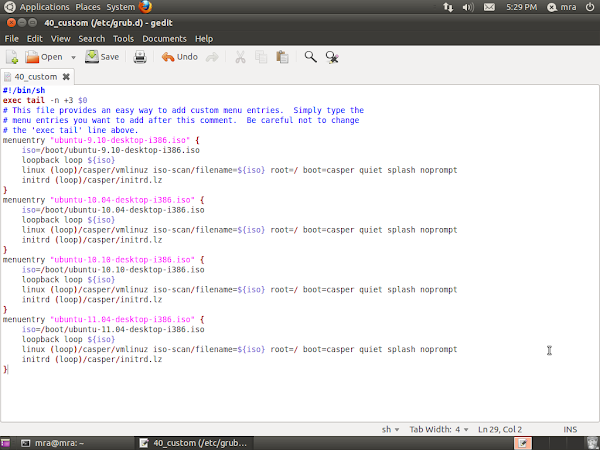
用外置裝置吧……要將裝置中的資料備份,再格式化裝置,再將映像檔寫入……
但若果沒有以上的裝置,哪如何安裝新系統?
If you want to install a new system to your harddisk,
You need write a install disc, it is a little
Bio Hazard Code Veronica / Resident Evil Code Veronica 評分 (Ranking)
評分準則如下
Chris取回打火機:加250分;否則減1000分
公邸救出Steve時間:快,加400分;中,0分;慢,減1000分
全地圖探索:加100分:否則0分
不使用急救噴霧:加1800分,否則0分
儲存:第一次儲存減
Chris取回打火機:加250分;否則減1000分
公邸救出Steve時間:快,加400分;中,0分;慢,減1000分
全地圖探索:加100分:否則0分
不使用急救噴霧:加1800分,否則0分
儲存:第一次儲存減
Bio Hazard 3 / Resident Evil 3 評分 (Ranking)
評分準則如下
| 時間 Time | 分數 Score |
|---|---|
| 2:29:59- | 100 |
| 2:30:00 ~ 2:39:59 | 90 |
| 2:40:00 ~ 2:59:59 | 80 |
| 3:00:00 ~ 3:39:59 | 70 |
| 3:30:00 ~ 4:09:59 | 60 |
| 4:10:00 ~ 4 |
Bio Hazard 2 / Resident Evil 2 評分 (Ranking)
評分準則如下
時間:2:29:59內完成遊戲為100分,每遲延30分鐘扣10分
儲存次數:不儲存為100分,每儲存1次扣5分
急救噴霧:不使用為100分,每使用1次扣10分
使用隱藏武器扣50分(只扣一次);
時間:2:29:59內完成遊戲為100分,每遲延30分鐘扣10分
儲存次數:不儲存為100分,每儲存1次扣5分
急救噴霧:不使用為100分,每使用1次扣10分
使用隱藏武器扣50分(只扣一次);
實用的 7-Zip 指令
7-Zip 是一種跨平台、開放源碼、免費、強大的壓縮工具
但是,7-Zip 只在 Windows 提供界面,若使用其他作業系統,例如 Linux 及 Macintosh 便沒有界面
當然你仍然可以使用其他具有界面,能整合 7-Zip 的壓縮工具
但若果你在完全沒有用戶界面的
但是,7-Zip 只在 Windows 提供界面,若使用其他作業系統,例如 Linux 及 Macintosh 便沒有界面
當然你仍然可以使用其他具有界面,能整合 7-Zip 的壓縮工具
但若果你在完全沒有用戶界面的
利用 Java 發送 HTTP POST 請求 (Using Java to send HTTP Request with POST method)
import java.io.FileOutputStream;import java.io.IOException;import java.io.InputStream;import java.io.OutputStreamWriter;import java.net.URL;import java.net.URLConnection;
public static void sentHttpPostRequest(String url, String args) throws IOException { URLConnection connection = new URL(url).openConnection(); // by default, connection with enable input, but won't enable output connection.setDoOutput(true); //connection.setDoInput(true)讓 Spreadsheet Excel Writer 的字串斷行 (Line Break in Spreadsheet Excel Writer)
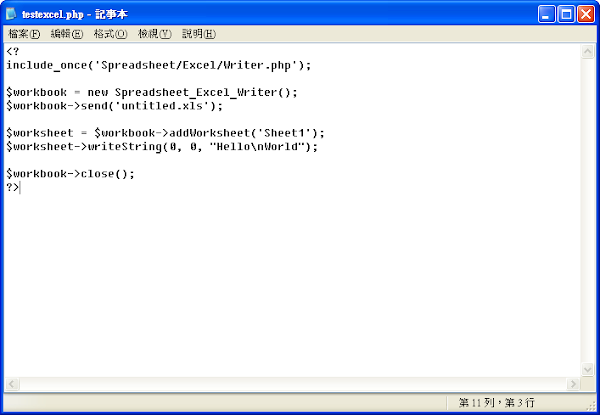
先編寫一個使用 Spreadsheet Excel Writer 輸出 Excel 檔案的 php 文件
並在儲存格中加入 \n 來將字串
Write a simple PHP file using Spreadsheet Excel Writer to export Excel file
利用 Microsoft Office Excel 開啟輸出的 Excel 檔案
發現儲存格字串並沒有斷行,可是輸入列卻顯示正常
Using Microsoft Office Excel to open the exported Excel file
You can discover the text in the cell
並在儲存格中加入 \n 來將字串
Write a simple PHP file using Spreadsheet Excel Writer to export Excel file

利用 Microsoft Office Excel 開啟輸出的 Excel 檔案
發現儲存格字串並沒有斷行,可是輸入列卻顯示正常
Using Microsoft Office Excel to open the exported Excel file
You can discover the text in the cell


