恢復 Ubuntu 的音量控制台 (Restore Ubuntu Volume Control Panel)
當升級 Ubuntu 系統後,有機會遺失音量控制台的快速啟動
雖然可以從 系統 > 偏好設定 > 聲音 來設定音量
這方法雖然可行,但只調整音量的情況下,顯得比較繁複
Sometimes after Upgrade your Ubuntu System, Volume Control Panel will be lost.
Although you can configure your System Volume in System > Preferences > Sound Preferences,
It is a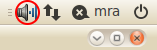
雖然可以從 系統 > 偏好設定 > 聲音 來設定音量
這方法雖然可行,但只調整音量的情況下,顯得比較繁複
Sometimes after Upgrade your Ubuntu System, Volume Control Panel will be lost.
Although you can configure your System Volume in System > Preferences > Sound Preferences,
It is a
使用 Java 上載檔案至 FTP 伺服器 (Use Java to upload file to FTP Server)
import java.io.DataOutputStream;import java.io.File;import java.io.FileInputStream;import java.io.IOException;import sun.net.TelnetOutputStream;import sun.net.ftp.FtpClient;
public static void send(String hostname, int port, String username, String password, File source, String destination) throws IOException { FtpClient ftp = new FtpClient(hostname, port); ftp.login(username, password); ftp.binary(); FileInputStream fos = new武器 VS Nemesis (Weapon VS Nemesis)
遊戲中正規武器對 Nemesis 的傷害數值
| 武器名稱 Weapon Name | Nemesis | ||||
|---|---|---|---|---|---|
| Type 1 | Type 2 | 迴避攻擊 Can Dodge | |||
| *使用彈數 Times | 阻止行動 Stop Action | 使用彈數 Times | 阻止行動 Stop Action | ||
| 刀 Knife | 41 | 不能 No | 58 | 不能 No | 不能 No |
| M92F 手槍 (通常彈) M92F Handgun (Normal) | 24 | 不能 No | 37 | 不能 No | 不能 |
為 Ubuntu 增加字型 (Add font types in Ubuntu)
將字型檔案放置在 /usr/share/fonts/truetype 中
不過為了容易整理文件,建議先在 /usr/share/fonts/truetype 中建立一個資料夾
Place the font type file to /usr/share/fonts/truetype
We recommend you create a directory in /usr/share/fonts/truetype to manager your customized font type files
放置好所
不過為了容易整理文件,建議先在 /usr/share/fonts/truetype 中建立一個資料夾
Place the font type file to /usr/share/fonts/truetype
We recommend you create a directory in /usr/share/fonts/truetype to manager your customized font type files
sudo mkdir /usr/share/fonts/truetype/custom
放置好所
讓 Windows Bootloader 載入 GRUB
為避免格式化 Ubuntu 後導致不能起動 Windows ,所以不讓 GRUB 成為 MBR
但使用 Windows 預設的 Bootloader 又不能列出非 Windows 的作業系統,所以需要改寫 C:\boot.ini
注意:胡亂改寫 C:\boot.ini 的會導致所有作業系統不能起動
If you use GRUB as MBR, after format Ubuntu partition GRUB will erase also
However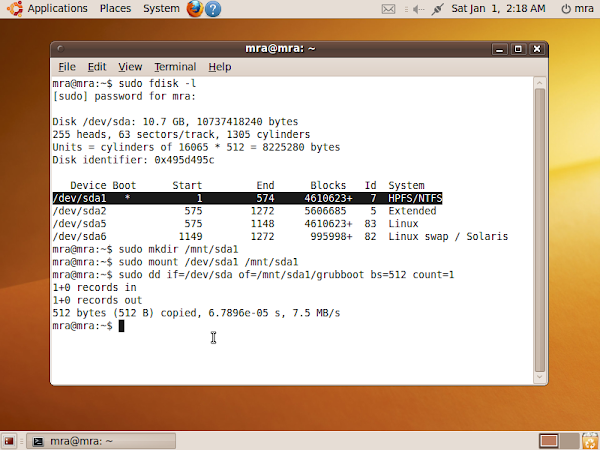
但使用 Windows 預設的 Bootloader 又不能列出非 Windows 的作業系統,所以需要改寫 C:\boot.ini
注意:胡亂改寫 C:\boot.ini 的會導致所有作業系統不能起動
If you use GRUB as MBR, after format Ubuntu partition GRUB will erase also
However
修復 Ubuntu 的 MBR (Recover Ubuntu GRUB as MBR)
GRUB 是一種出名的 Bootloader
但當 GRUB 被其他 Bootloader 覆蓋,如何重新讓 GRUB 成為 MBR ?
GRUB is a popular Bootloader.
However, how could we recover GRUB is covered by other Bootloader ?
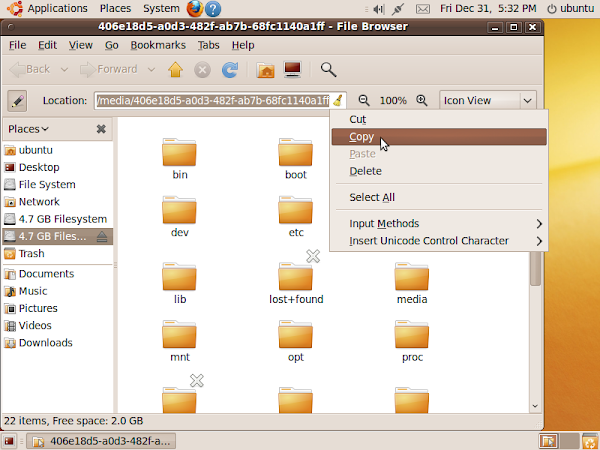
先以 Ubuntu Live Boot Disc 起動
開啟已經安裝 GRUB 的分割區
複製該分割區的絕對路徑
We need to boot with Ubuntu Live Boot Disc.
Open the partition which you have installed GRUB.
Then copy the path
但當 GRUB 被其他 Bootloader 覆蓋,如何重新讓 GRUB 成為 MBR ?
GRUB is a popular Bootloader.
However, how could we recover GRUB is covered by other Bootloader ?

先以 Ubuntu Live Boot Disc 起動
開啟已經安裝 GRUB 的分割區
複製該分割區的絕對路徑
We need to boot with Ubuntu Live Boot Disc.
Open the partition which you have installed GRUB.
Then copy the path
修復 Windows 的 MBR (Recover Windows Bootloader as MBR)
若電腦系統曾經運行 Windows 與 Ubuntu 雙系統
當 Ubuntu 被格式化後,由於會連同 GRUB 一拼刪除,若果 MBR 被 Ubuntu 覆寫 MBR 不會引導 Windows 的 Bootloader
因此將會導致沒有 Bootloader 起動 Windows
若要重新起動 Windows 便需要修復 MBR 引導 Windows 的 Bootloader
If the computer run with Windows and UBunut 2 Systems
After you format Ubuntu, you should recover Windows Bootloader as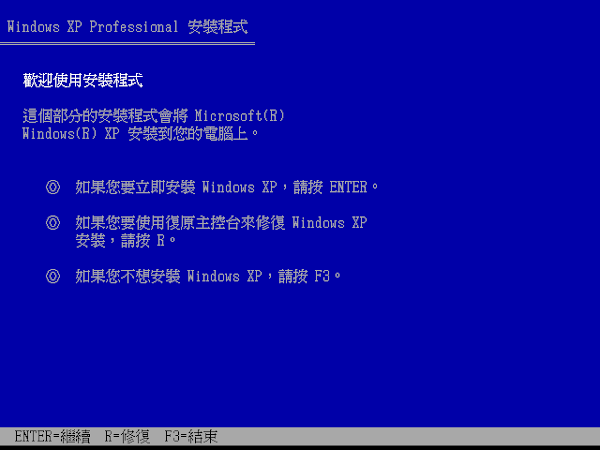
當 Ubuntu 被格式化後,由於會連同 GRUB 一拼刪除,若果 MBR 被 Ubuntu 覆寫 MBR 不會引導 Windows 的 Bootloader
因此將會導致沒有 Bootloader 起動 Windows
若要重新起動 Windows 便需要修復 MBR 引導 Windows 的 Bootloader
If the computer run with Windows and UBunut 2 Systems
After you format Ubuntu, you should recover Windows Bootloader as