Configuring wifi headless with connmanctl on LibreELEC via SSH
Because I love doing things quite backwards, I found myself in a predicament: I had only a wired direct connection between my laptop and the Raspberry Pi where I was running LibreELEC. Using mDNS I could connect to it directly connected at LibreELEC.local , and that's great...
But I wanted to join it to a WiFi network, and I only had a not-great 6-button remote control to plug into the Pi, so entering in long passwords via the UI (if that's
Forcing PCI Express Gen 3.0 speeds on the Pi 5
The Raspberry Pi 5 includes 5 active PCI Express lanesâ4 go to the new RP1 chip for I/O like USB, Ethernet, MIPI Camera and Display, and GPIO, and 1 goes to a new external PCIe connector:

By default, all PCIe lanes operate at Gen 2.0 speeds, or about 5 GT/sec per lane. Currently there's no way to change that default for the RP1 chip's 'internal' lanes, but on the external connector, you
Overclocking and *Underclocking* the Raspberry Pi 5
Less than a week from the Raspberry Pi 5's announcement , enthusiasts with early access to the board have already been pushing it to its limits, overclocking the CPU to 3.1 GHz, and the GPU to 1 GHz.

The BCM2712 SoC's defaults are 2.4 GHz, and 800 MHz, respectively; so by the numbers, one should expect 25% better CPU performance, and 22% better GPU performance.
In reality, the results are a slight
nmcli for WiFi on Raspberry Pi OS 12 'Bookworm'
If you haven't already, check out my full video on the Raspberry Pi 5 , which inspired this post.

Raspberry Pi OS 12 'Bookworm' is coming alongside the release of the Raspberry Pi 5, and with it comes a fairly drastic change from using wpa_supplicant for WiFi interface management to everything network-related running through nmcli , or NetworkManager .
nmcli is widely adopted in Linux these days, and it makes managing WiFi, LAN, and other network connections much simpler.
I thought I'd
Answering some questions about the Raspberry Pi 5
It's less than 12 hours since the Pi 5 launch, and already there's a few hundred questions whizzing aboutâI thought I'd answer some of the things I see people asking most frequently, like:
Does the new Case have room for the Active Cooler, or other Pi HATs?

Yes, indeed it does! You can pop out the fan bracket in the new Case, and fit many normal-size Pi HATs. This is useful also if you want to stack cases
Testing PCIe on the Raspberry Pi 5
If you haven't heard, the Raspberry Pi 5 was announced today (it'll be available in October).

I have a full video going over the hardwareâwhat's changed, what's new, and what's goneâand I've embedded it below. Scroll beyond to read more about specs, quirks, and some of the things I learned testing a dozen or so PCIe devices with it.
The Video
100 SBCs, Python Flask, and two NUCs for MrBeast
If you haven't already, watch How I almost broke MrBeast's 1-100 video , which provides context for this blog post.

On March 1st, Network Chuck asked me if I had a couple weeks to help him build out a system to manage buttons and LEDs for a MrBeast video.
A few weeks later, we handed off our system to capable folks on the MrBeast team. In May, they published Ages 1 - 100 Fight For $500,00
Testing 10 GbE throughput on Windows - iperf3 is outdated
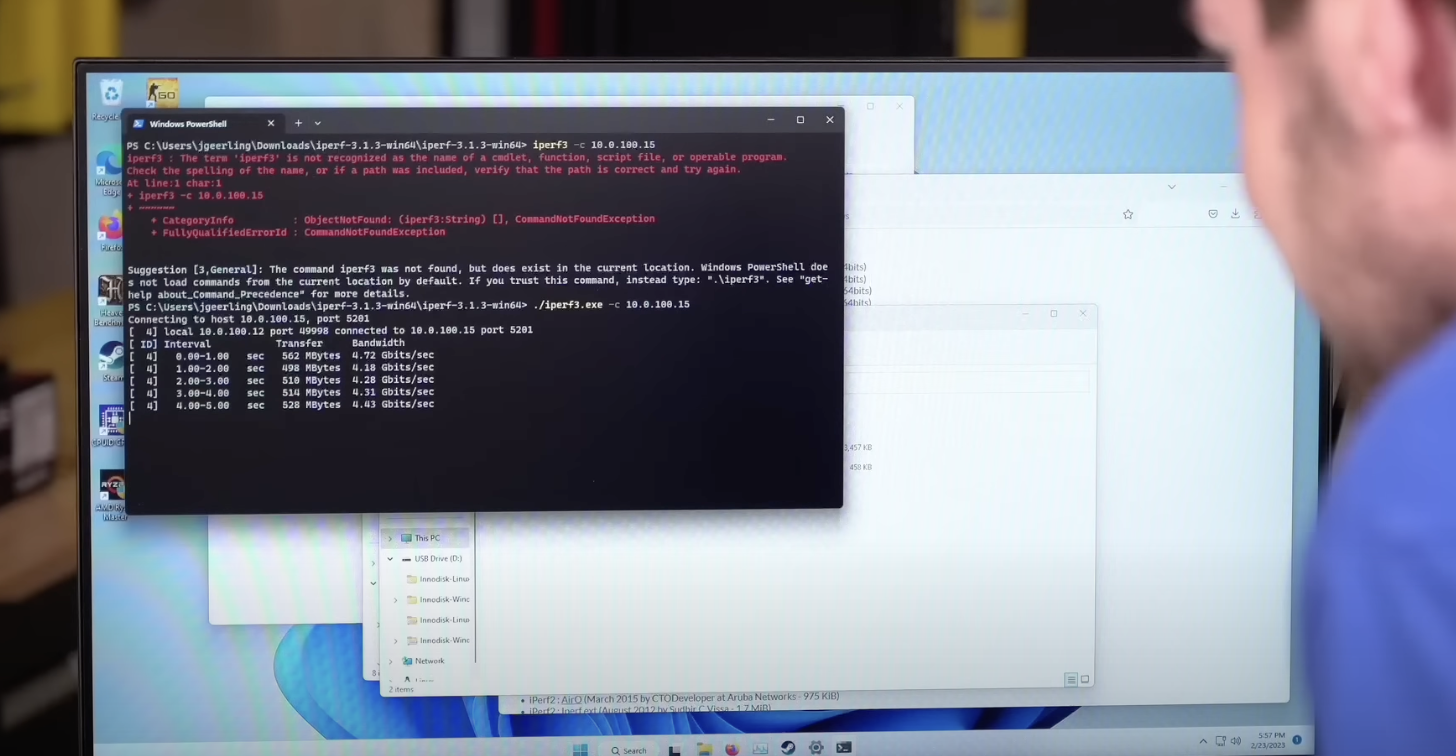
Recently I upgraded my AMD-based PC on a livestream, and I installed an Innodisk EGPL-T101 10 Gbps M.2 NIC ( link to Innodisk product page ).
Under Linux, I could get through 9.4 Gbps using iperf3 between the PC and my Mac Studio. But under Windows, I could only get up to about 4.5 Gbps (tested around 1h 27m into the stream )!
I had downloaded the latest version of iperf3 for Windows from
Testing the Coral TPU Accelerator (M.2 or PCIe) in Docker

I recently tried setting up an M.2 Coral TPU on a machine running Debian 12 'Bookworm', which ships with Python 3.11, making the installation of the pyCoral library very difficult (maybe impossible for now?).
Some of the devs responded 'just install an older Ubuntu or Debian release' in the GitHub issues, as that would give me a compatible Python version (3.9 or earlier)... but in this case I didn't want to do that.
How to solve "error: externally-managed-environment" when installing via pip3
On Debian 12 Bookworm, Ubuntu 24.04 Noble Numbat, and macOS 14+ installs, when I try running pip3 install [something] (whether that's Ansible or some other Python tool), I get the following error message:
error: externally-managed-environmentà This environment is externally managedâ°â> To install Python packages system-wide, try apt install python3-xyz, where xyz is the package you are trying to install.